01. Getting Started

Data Science for Economists

2026-03-01

What this course is about

  • Data science skills complementary to standard econometrics
  • Data cleaning and wrangling, visualization, databases, machine learning, etc.
  • Research in (broadly defined) International Economics shifts towards empirics
    • I never had this course but wish I did.

WHO WE ARE

name / institution / coding background

This Course

  • Two-day intensive short course (Tue–Wed)
  • Each session: mix of slides and hands-on coding
  • Goal: leave with a working toolkit, not just slides

Course overview

Day 1: Tuesday

Time Session
9:00 – 10:30 Getting Started – Reproducibility, Git, Docker, IDE setup
10:45 – 12:30 Toolkit – Shell basics, R fundamentals, Quarto
13:30 – 15:00 Large Structured Data – Millions of rows: data.table, Parquet, duckplyr
15:15 – 17:00 Web Scraping & APIs – HTML parsing, APIs, online prices

Day 2: Wednesday

Time Session
9:00 – 10:30 Spatial & Satellite Data – CRS, nightlights, satellite imagery in R
10:45 – 12:30 Text as Data – Tokenization, bag-of-words, policy uncertainty
13:30 – 15:00 Large Language Models – LLM APIs, structured output, training a mini-LLM
15:15 – 17:00 AI-Assisted Research – CLAUDE.md, agents, skills, LLM workflows

Web Scraping

  • “One Billion Prices Project”: Web-scraped prices for many stores and countries (Cavallo & Rigobon, 2016)
  • Are online prices different than offline prices?

Satellite Imagery

Large Structured Data

Arithmetic scale

Log-log scale

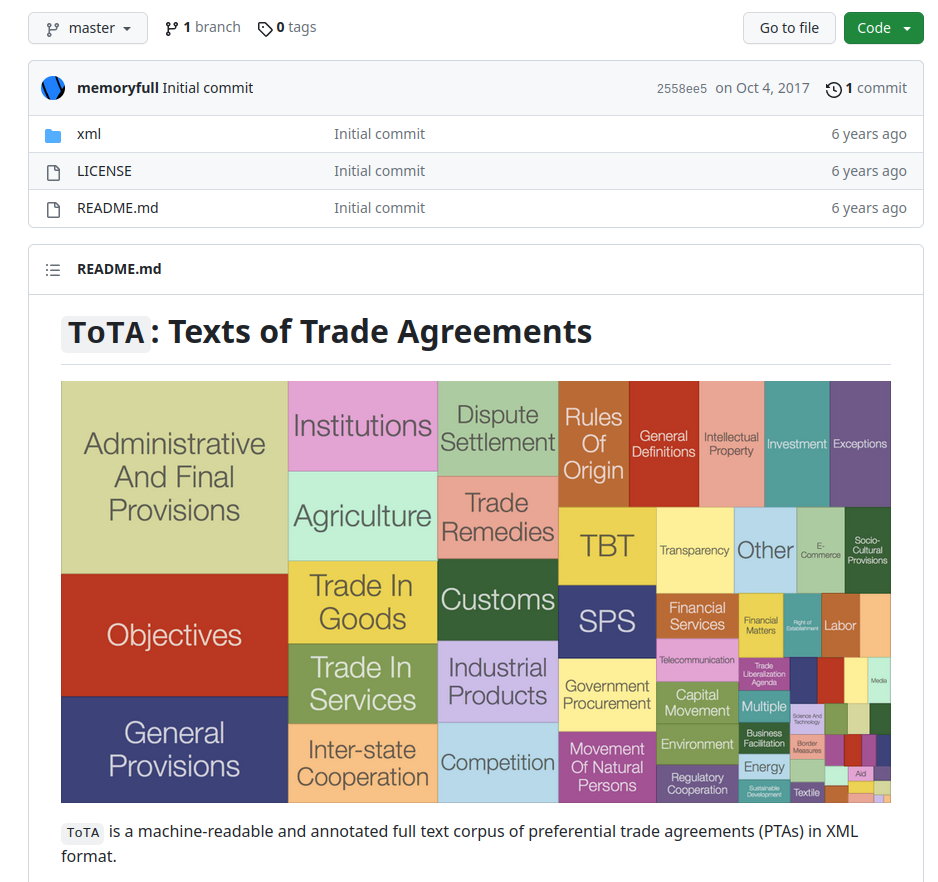
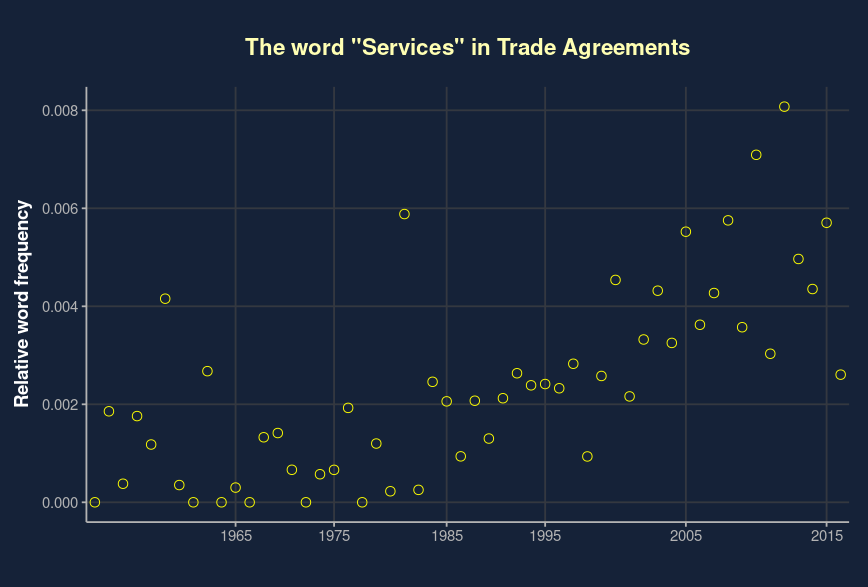
Text as Data

Text as Data

LLMs and Historical Data

Göttlich, Jiang, Loibner & Voth (2025): Ranke-4B — language models trained exclusively on time-stamped historical text

  • 4-billion-parameter models with knowledge cutoffs at 1913, 1929, 1933, 1939, 1946
  • Trained on ~80 billion tokens of curated historical sources
  • “Time-locked”: the model literally cannot know what happens after its cutoff
  • Avoids hindsight contamination of modern LLMs roleplaying a historical period

GitHub: DGoettlich/history-llms

Course logistics

Format

  • Each session: ~1.5 hours
  • Mix of slides + live-coding
  • All code available on GitHub — clone the repo and follow along

Resources

  • GitHub: github.com/julianhinz/data-science-ASP-2026
  • All slides, code, and data links in the repository
  • Dreber (2025), “A Framework for Evaluating Reproducibility”, Economic Inquiry
  • ~30% of economics studies meet basic reproducibility standards (NBER WP 33753, 2025)

Questions?

GOOD RESEARCH PRACTICE

Session Roadmap

  • Reproducibility
  • Git and GitHub
  • Docker and Dev Containers
  • Setting up your machines

Reproducibility

Reproducibility

  • Mostly for your future self!
  • but of course also: Science.

“Trying to replicate the estimates from an early draft of a paper, we discover that the code that produced the estimates no longer works because it calls files that have since been moved.

Now: No longer works.”

“Between regressions number of observations falling. After much sleuthing, we find that many observations were dropped in a merge because they had missing values for the county identifier we were merging on. When we correct the mistake and include the dropped observations, the results change dramatically.”

“Me and my coauthor write code that refers to a common set of data files stored on a shared folder. Our work is constantly interrupted because changes one of us makes to the data files causes the others’ code to break.”

8 building blocks of reproducibility

Code and Data in the Social Sciences (Gentzkow and Shapiro):

  1. Automation — Automate everything; write a single script that executes all code from beginning to end. Use a “master” file or, even better, use make.
  2. Version Control — Store code and data under version control. Run the whole directory before checking it back in. Use Git.
  3. Directories — Separate directories by function. Separate files into inputs and outputs. Make directories portable. Use code, input, output and temp folders.
  4. Keys — Store cleaned data in tables with unique, non-missing keys. Keep data normalized as far into your code pipeline as you can.
  5. Abstraction — Abstract to eliminate redundancy and improve clarity. Otherwise, don’t abstract.
  6. Documentation — Don’t write documentation you will not maintain. Code should be self-documenting.
  7. Management — Manage tasks with a task management system. E-mail is not a task management system.
  8. Code Style — Keep it short and purposeful. Use descriptive names. Be consistent. Stick to a style guide.

Quick aside: Style guides

Git and GitHub

Git

  • Git is a distributed version control system
    • “Dropbox and the ‘Track changes’ feature in MS Word have a baby: Git”
  • Optimized for code (not data, actually)

GitHub

  • Online hosting platform that provides services built on top of the Git system
    • Similar: Bitbucket and GitLab
  • Makes Git a lot more user friendly
  • Seamless integration into lots of other software: VS Code

4 Main Git Operations

  1. Stage (or “add”): Add changes to the repo history
    • file edits, additions, deletions, etc.
  2. Commit: Yes, you are sure these changes should be part of the repo history
    • need to add a message (and optionally a description)
  3. Pull: Download new changes made on the GitHub repo (i.e. the upstream remote)
    • either by your collaborators or you on another machine
  4. Push: Upload any (committed) local changes to the GitHub repo

Merge Conflicts

# README
Some text here.
<<<<<<< HEAD
Text added by Partner 2.
=======
Text added by Partner 1.
>>>>>>> 814e09178910383c128045ce67a58c9c1df3f558.
More text here.
  • Delete lines that you don’t want, then the special Git merge conflict symbols
  • Then: stage, commit, pull and push

Branches and Forks

Branch

  • Take snapshot of existing repo and try out a whole new idea without affecting your main branch
  • If new idea works, merge back into main branch
    • fix bugs
    • implement new empirical strategies, robustness checks, …
  • If it doesn’t work, just delete the experimental branch

Branches and Forks

Fork

  • Forking a repo is similar to a branch, but creates a copy of the entire repo
  • Upstream pull request makes merge back into origin repo possible
    • Easy to do on GitHub

.gitignore

  • Tells Git what to ignore
    • exclude whole folders or a class of files (e.g. based on size or type)
  • Simply add names of files or folders that should be ignored

Docker and Dev Containers

Docker: Why?

  • “It works on my machine” — Docker ensures it works on every machine
  • Packages your code + dependencies + OS into a portable container
  • Reproducibility: collaborators (and your future self) get the exact same environment

Dev Containers: The Modern Workflow

  • Dev Containers = Docker + your IDE, seamlessly integrated
  • VSCode supports Dev Containers natively
  • Open a project → IDE detects .devcontainer/ config → launches container automatically
  • You code inside the container as if it were your local machine
// .devcontainer/devcontainer.json (minimal example)
{
  "name": "R Data Science",
  "image": "rocker/tidyverse:4.4",
  "customizations": {
    "vscode": { "extensions": ["REditorSupport.r"] }
  }
}

Setting up your machines

What you need installed

  • R (4.4+) and Quarto (1.6+)
  • Git — we’ll use it throughout the course
  • VSCode with the R extension

macOS / Linux: Use Homebrew

# Install Homebrew (if not already installed)
/bin/bash -c "$(curl -fsSL https://raw.githubusercontent.com/Homebrew/install/HEAD/install.sh)"

# Install R, Git, and Quarto
brew install r git quarto
  • Homebrew: brew.sh — package manager for macOS and Linux
  • Keeps everything up to date with brew upgrade

R packages

install.packages(c("tidyverse", "data.table", "quarto"))
# For the LLM module on Day 2:
install.packages(c("ellmer", "torch"))
torch::install_torch()  # one-time download of the C++ backend